How to Use Apple AI (Apple Intelligence)
Apple has introduced a new generation of artificial intelligence features known as Apple Intelligence. If you want to understand how to use Apple AI, this guide provides a clear, step-by-step explanation to help you get started and maximize its benefits across your devices.
What Is Apple AI
Apple Intelligence, officially known as Apple Intelligence, is a system designed to enhance user experience through smart automation and personalized assistance.
Introduction to Apple Intelligence
Apple Intelligence integrates AI directly into the operating system, making it accessible in everyday tasks.
Key Features Overview
- Smart writing tools
- AI-powered summaries
- Context-aware suggestions
- Voice-based assistance
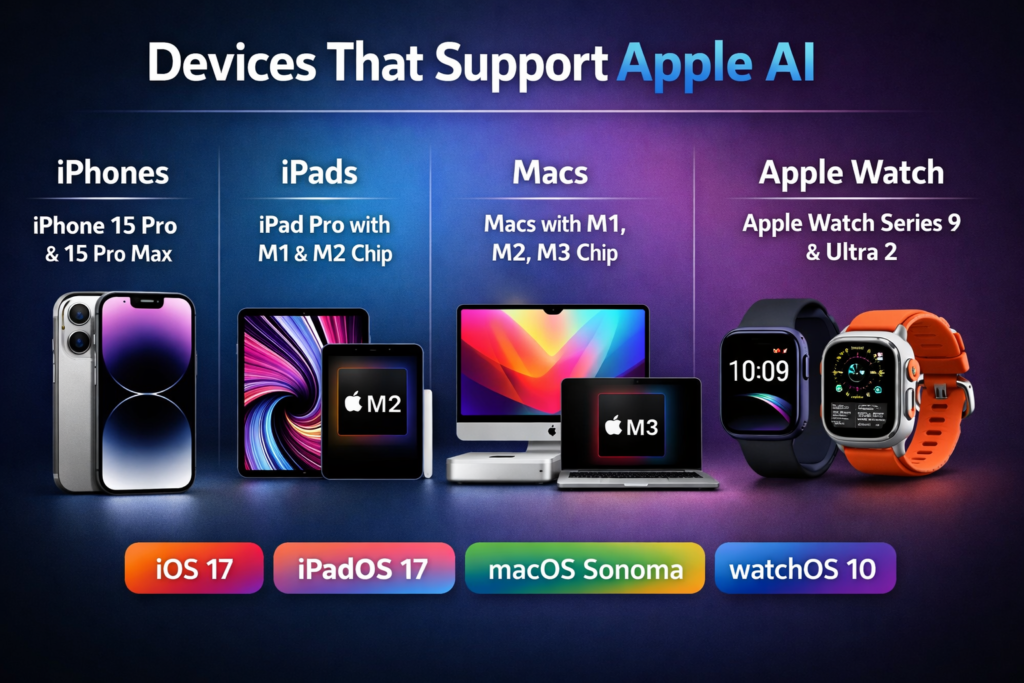
Devices That Support Apple Intelligence
It works only on supported hardware.
iPhone Compatibility
It is available on newer devices such as
iPhone 15 Pro and later models.
Mac and iPad Support
Supported devices include:
- Macs with Apple silicon chips
- iPads with advanced processors
These devices ensure smooth AI performance.
How to Set Up
Setting up is simple.
Enabling Apple Intelligence
- Update your device to the latest OS
- Go to settings
- Enable Apple Intelligence features
Required Settings
- Activate Siri
- Enable language and region support
- Allow AI features in apps
Using Apple Intelligence for Writing
It improves writing across apps.
Smart Writing Tools
- Rewrite text for clarity
- Adjust tone and style
- Generate suggestions
Text Summarization
- Summarize long emails
- Extract key points from notes
- Simplify complex content
Using for Productivity
It helps streamline daily tasks.
Smart Notifications
- Prioritizes important alerts
- Filters unnecessary notifications
- Provides summaries
Email and Notes Assistance
- Draft emails quickly
- Organize notes automatically
- Suggest replies
Using Apple Intelligence with Voice Commands
Voice interaction is a core feature.
Siri Integration
It enhances Siri with smarter responses and contextual understanding.
Voice Automation
- Control apps using voice
- Set reminders
- Perform tasks hands-free
Privacy and Security Features
Apple focuses heavily on user privacy.
On Device Processing
- Most AI tasks run locally
- Reduces data sharing
Data Protection
- End-to-end encryption
- Secure cloud processing when needed
Tips to Maximize
Using it effectively improves productivity.
Daily Use Cases
- Writing emails
- Managing schedules
- Organizing tasks
Advanced Features
- Cross-app integration
- Context-aware suggestions
- Automation workflows
Common Mistakes to Avoid
Avoid these issues for better results.
Misconfiguration
- Not enabling all required settings
- Using unsupported devices
Overreliance on AI
- Always review AI-generated content
- Maintain human oversight
Frequently Asked Questions
1. What is Apple AI
Apple Intelligence, or Apple Intelligence, is a system that integrates artificial intelligence into Apple devices to improve productivity and user experience.
2. How do I enable Apple AI
Update your device, go to settings, and enable Apple Intelligence features.
3. Which devices support Apple AI
Newer iPhones, Macs with Apple silicon, and advanced iPads support it.
4. Is Apple AI safe to use
Yes, Apple prioritizes privacy with on-device processing and secure data handling.
5. Can Apple AI write emails
Yes, it can draft, rewrite, and summarize emails efficiently.
6. Does Apple AI require internet access
Some features work offline, while others require internet for cloud processing.
If you want to improve productivity and simplify daily tasks, start using Apple AI today. Explore its features, customize your settings, and integrate it into your workflow to unlock the full potential of intelligent automation across your Apple devices.