

Claude Code vs Cursor: Which AI Coding Tool Wins in 2026?
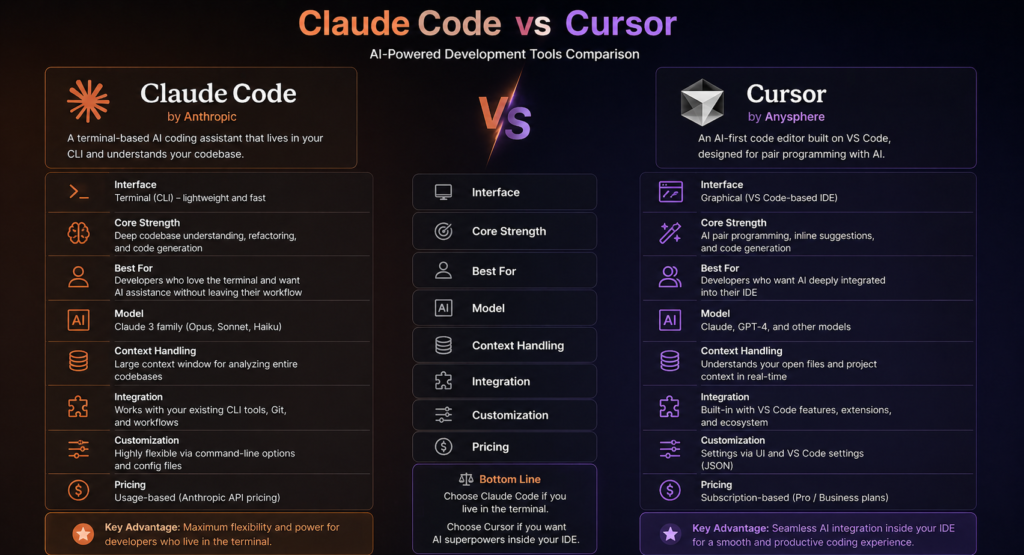
Introduction to Claude Code vs Cursor
The debate around claude code vs cursor is growing as developers look for smarter AI coding assistants. Both tools promise faster development, cleaner code, and improved productivity. However, choosing the right one depends on your workflow, goals, and technical needs.
Moreover, understanding their differences helps you avoid wasted time and resources. Therefore, this guide breaks down everything you need to know.

What Is Claude Code?
Claude Code is an AI-powered development tool built by Anthropic. It focuses on safe, reliable, and context-aware code generation. Additionally, it excels in long-form reasoning and structured outputs.
Developers often prefer it for complex logic tasks. Therefore, it’s ideal for backend systems and large-scale applications.
Key Features of Claude Code
Claude Code offers several powerful capabilities:
- Advanced natural language understanding
- Strong contextual memory
- Secure and ethical AI responses
- High-quality code generation
Moreover, it performs well in multi-step reasoning tasks. This makes it highly reliable for professional environments.
What Is Cursor?
Cursor is an AI-first code editor designed to enhance productivity inside the IDE. It integrates directly into your development workflow. Additionally, it provides real-time suggestions and code generation.
Unlike traditional tools, Cursor acts like a collaborative coding partner. Therefore, it’s popular among developers who want speed and convenience.
Key Features of Cursor
Cursor focuses on usability and speed:
- Built-in AI chat inside the editor
- Instant code suggestions
- Seamless integration with existing projects
- Fast debugging assistance
Moreover, its interface feels familiar to users of Visual Studio Code. This lowers the learning curve significantly.
Claude Code vs Cursor: Core Differences
Understanding the core differences in claude code vs cursor helps you make a better decision. While both tools use AI, their approach is quite different.
Architecture and Design
Claude Code operates as an API-driven assistant. Therefore, it integrates into various tools and workflows.
Cursor, on the other hand, is a full IDE experience. Additionally, it embeds AI directly into the coding environment.
Performance and Accuracy
Claude Code excels in deep reasoning and complex tasks. Moreover, it handles large prompts effectively.
Cursor focuses on speed and responsiveness. Therefore, it’s better suited for quick edits and iterative coding.
User Experience
Cursor offers a seamless in-editor experience. Additionally, it feels like a natural extension of your IDE.
Claude Code requires external setup. However, it provides more flexibility in usage.
Claude Code vs Cursor: Use Case Comparison
Choosing between claude code vs cursor depends heavily on your use case.
Best for Beginners
Cursor is easier to start with. Its interface is intuitive and requires minimal setup.
Therefore, beginners often prefer it for learning and quick projects.
Best for Advanced Developers
Claude Code is more powerful for complex systems. Moreover, it supports advanced workflows and integrations.
Therefore, experienced developers benefit more from its capabilities.
Best for Team Collaboration
Cursor supports real-time editing and collaboration. Additionally, it fits well into agile workflows.
Claude Code, however, shines in backend automation and API-driven environments.
Pros and Cons of Claude Code
Advantages
- Strong reasoning capabilities
- Better for complex tasks
- Flexible API integration
Disadvantages
- Requires setup and configuration
- Slower for quick edits
Pros and Cons of Cursor
Advantages
- Easy to use
- Fast and responsive
- Integrated development experience
Disadvantages
- Limited deep reasoning
- Less flexible outside the IDE
Pricing Comparison
Pricing is another key factor in the claude code vs cursor debate.
Claude Code typically charges based on API usage. Therefore, costs depend on how much you use it.
Cursor usually offers subscription-based pricing. Additionally, it may include free tiers for basic use.
Security and Privacy
Claude Code emphasizes safety and ethical AI design. Moreover, it includes safeguards for sensitive data.
Cursor also prioritizes security. However, its integration within the IDE may require additional configuration.
Which One Should You Choose?
The answer depends on your needs. If you want deep reasoning and flexibility, Claude Code is the better option.
However, if you prefer speed and ease of use, Cursor is ideal. Therefore, many developers use both tools together.
FAQs
What is the main difference in claude code vs cursor?
Claude Code focuses on deep reasoning, while Cursor emphasizes speed and IDE integration.
Which tool is better for beginners?
Cursor is better for beginners due to its simple interface and quick setup.
Is Claude Code more powerful than Cursor?
Yes, Claude Code offers more advanced reasoning capabilities for complex tasks.
Can I use both tools together?
Yes, many developers combine them for maximum productivity.
Which tool is more cost-effective?
It depends on usage. Cursor offers predictable pricing, while Claude Code varies based on API calls.
Conclusion
In the claude code vs cursor comparison, there is no one-size-fits-all answer. Each tool excels in different areas, making them valuable in their own way.
Moreover, your choice should align with your workflow and project requirements. Therefore, evaluate your needs carefully and test both tools if possible.
Start exploring today and choose the AI coding assistant that boosts your productivity.
